Hyundai Genesis (DH): Differential Carrier Assembly / Rear Differential Carrier Repair procedures

Removal
1.
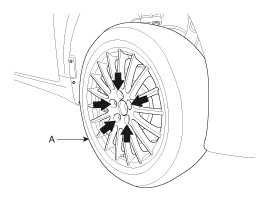
Remove the rear wheel and tire (A) from the rear hub.

Tightening torque:
88.3 ~ 107.9 N.m (9.0 ~ 11.0 kgf.m, 65.1 ~ 79.6 lb-ft)

   
Be careful not to damage the hub bolts when removing the rear wheel and tire (A).

2.
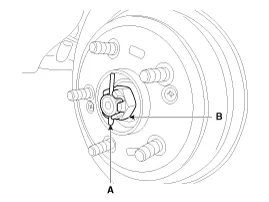
With the brake engaged, remove the split pin (A) from the rear hub and remove the castle nut (B).

Tightening torque :
196.1 ~ 274.5 N.m (20.0 ~ 28.0 kgf.m, 144.7 ~ 202.5 lb-ft)

3.
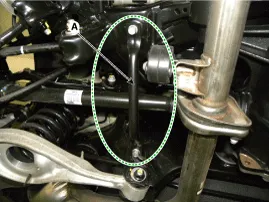
Remove the bracket (A).

Tightening torque :
49.0 ~ 63.7N.m (5.0 ~ 6.5 kgf.m, 36.2 ~ 47.0 lb-ft)

4.
Remove the muffler.
(Refer to Engine Mechanical System - "Muffler")
5.
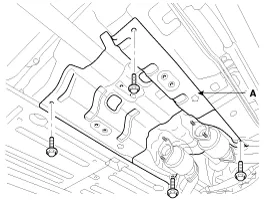
Loosen the mount bolts and then aluminum cover (A).

Tightening torque:
6.9 ~ 13.7 N.m (0.7 ~ 1.4 kgf.m, 5.1 ~ 10.1 lb-ft)

6.
Record the position of the alignment marks (C) on the rubber coupling of the propeller (A) and companion and the corresponding marks on the differential carrier (B), and then remove the propeller shaft tightening bolt (D).

Tightening torque :
88.3 ~ 107.9 N.m (9.0 ~ 11.0 kgf.m, 65.1 ~ 79.6 lb-ft)


    Component 1. Rear differential carrier assembly Component [With Lambda Engine] 1. Pinion lock nut 2. Companion flange 3. Pinion oil seal 4.

    Other information:

    Hyundai Genesis (DH) 2013-2016 Service Manual: Start/Stop Button Repair procedures

    Removal 1. Disconnect the negative(-) battery terminal. 2. Remove the driver crash pad lower panel. (Refer to Body - "Crash Pad Lower Panel") 3. Remove the start/stop button (A) from the center fascia garnish after loosening the mounting clip.

    Hyundai Genesis (DH) 2013-2016 Service Manual: Evaporator Temperature Sensor Repair procedures

    I

    Categories

     
    Copyright В© 2026 www.hgenesisdh.com - 0.0236