
Hyundai Genesis (DH): Fuel Delivery System / Fuel Tank Repair procedures
Hyundai Genesis (DH) 2013-2016 Service Manual / Engine Control / Fuel System / Fuel Delivery System / Fuel Tank Repair procedures
| Removal |
| 1. |
Release the residual pressure in fuel line.
(Refer to Fuel Delivery System - "Release Residual Pressure in Fuel Line") |
| 2. |
Turn the ignition switch OFF and disconnect the negative (-) battery cable. |
| 3. |
Fold the rear seat cushion. |
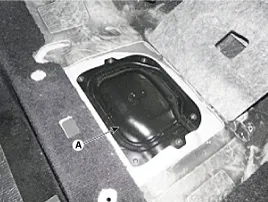
| 4. |
Remove the service cover (A) of the fuel pump after loosening the screws.
|
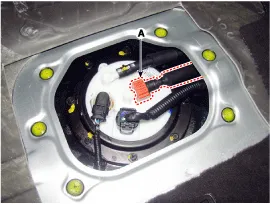
| 5. |
Disconnect the fuel feed tube quick - connector (A).
|
| 6. |
Lift the vehicle. |
| 7. |
Remove the rear-RH wheel, tire and inner wheel house. |
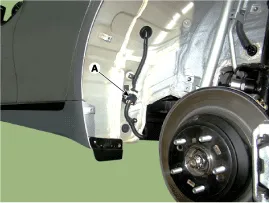
| 8. |
Disconnect the fuel tank extension connector (A), and then remove the wiring harness from the vehicle.
|
| 9. |
Remove the center muffler assembly.
(Refer to Engine Mechanical System - "Muffler") |
| 10. |
Remove the propeller shaft assembly.
(Refer to Driveshaft and Axle - "Propeller shaft Assembly") |
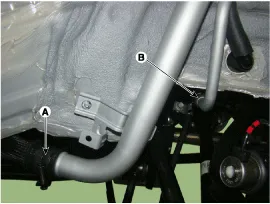
| 11. |
Disconnect the fuel filler hose (A) and leveling hose (B).
|
| 12. |
Support the fuel tank with jack (A).
|
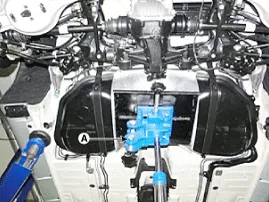
| 13. |
Remove the fuel tank installation nut (A) and then loosen the fuel tank (B).
|
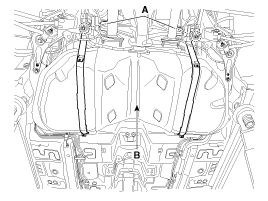
| 14. |
Disconnect the vent hose (A) and then remove the fuel tank.
|
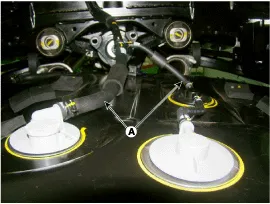
| Installation |
| 1. |
To install, reverse the removal procedure.
|
Fuel Pressure Test 1. Release the residual pressure in fuel line. (Refer to Fuel Delivery System - "Release Residual Pressure in Fuel Line") When removing the fuel pump relay, a Diagnostic Trouble Code (DTC) may turn up.
Removal 1. Release the residual pressure in fuel line. (Refer to Fuel Delivery System - "Release Residual Pressure in Fuel Line") 2. Fold the rear seat cushion.
Other information:
Hyundai Genesis (DH) 2013-2016 Service Manual: Components and Components Location
C
Hyundai Genesis (DH) 2013-2016 Service Manual: Compressor Description and Operation
Description The compressor is the power unit of the A/C system. It is located on the side of engine block and driven by a V-belt of the engine. The compressor changes low-pressure and low-temperature refrigerant gas into high-pressure and high-temperature refrigerant gas.
Categories
- Manuals Home
- Hyundai Genesis Owners Manual
- Hyundai Genesis Service Manual
- Brake System
- Repair procedures
- Evaporative Emission Control System
- New on site
- Most important about car

Copyright В© 2026 www.hgenesisdh.com - 0.0245