Hyundai Genesis (DH): Front Driveshaft Assembly / Front Driveshaft Repair procedures

Removal
1.
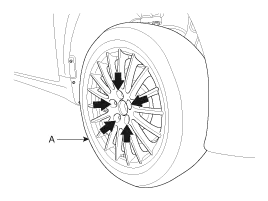
Loosen the wheel nuts slightly. Raise the vehicle, and make sure it is securely supported.
2.
Remove the front wheel and tire (A) from the front hub.

   
Be careful not to damage the hub bolts when removing the front wheel and tire.
3.
Remove the brake caliper assembly.
(Refer to Brake System - "Front Disc Brake")
4.
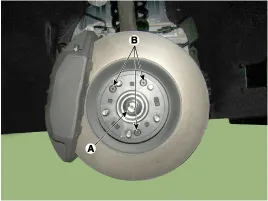
Loosen the driveshaft caulking nut (A) and then remove the brake disc by loosening the screw (B-3EA).

Tightening torque
A : 274.6 ~ 294.2 N.m (28.0 ~ 30.0 kgf.m, 202.5 ~ 217.1 lb-ft)
B : 4.9 ~ 5.9 N.m (0.5 ~ 0.6 kgf.m, 3.6 ~ 4.3 lb-ft)


    Components 1. Front driveshaft (LH)2. Inner shaft bearing bracket3. Front driveshaft (RH)

    Other information:

    Hyundai Genesis (DH) 2013-2016 Service Manual: Description and Operation

    Description Integrated Rain Sensor Integrated rain sensor (A) controls three systems: front wiper, auto-light, and central air conditioner. 1. Wiper Control System When "AUTO" switch signal is received from the multi-function switch on the right, the integrated rain sensor detects the amount of rainfall.

    Hyundai Genesis (DH) 2013-2016 Service Manual: Head Up Display Unit Repair procedures

    Removal 1. Disconnect the negative (-) battery terminal. 2. Remove the head up display bezel (A). 3. Remove the instrument cluster. (Refer to Indicators And Guages - "Instrument Cluster") 4. Remove the head up display unit bracket (A) after loosening the mounting nuts.

    Categories

     
    Copyright В© 2026 www.hgenesisdh.com - 0.0241