
Hyundai Genesis (DH): Front Driveshaft Assembly / Front Driveshaft Components and Components Location
Hyundai Genesis (DH) 2013-2016 Service Manual / Driveshaft and axle / Front Driveshaft Assembly / Front Driveshaft Components and Components Location
| Components |
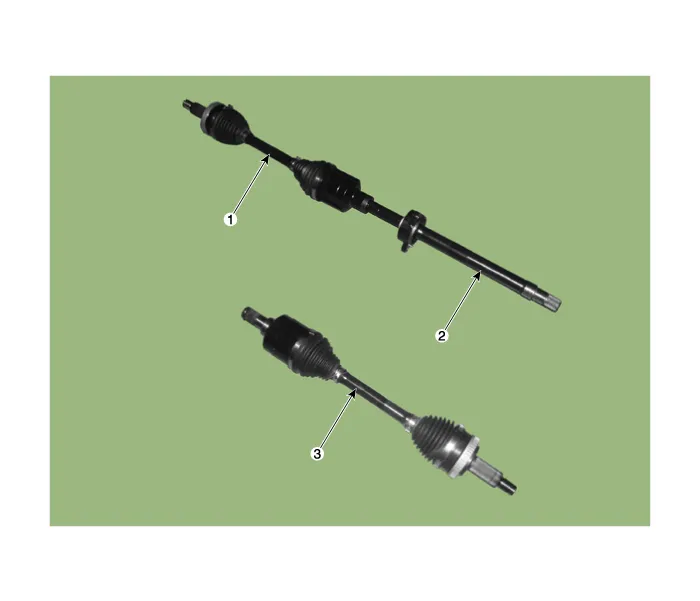
| 1. Front driveshaft (LH) 2. Inner shaft bearing bracket | 3. Front driveshaft (RH) |
Removal 1. Loosen the wheel nuts slightly. Raise the vehicle, and make sure it is securely supported. 2. Remove the front wheel and tire (A) from the front hub.
Other information:
Hyundai Genesis (DH) 2013-2016 Service Manual: Compressor Description and Operation
Description The compressor is the power unit of the A/C system. It is located on the side of engine block and driven by a V-belt of the engine. The compressor changes low-pressure and low-temperature refrigerant gas into high-pressure and high-temperature refrigerant gas.
Hyundai Genesis (DH) 2013-2016 Service Manual: Heater Unit Repair procedures
R
Categories
- Manuals Home
- Hyundai Genesis Owners Manual
- Hyundai Genesis Service Manual
- 4 Wheel Drive (AWD) System
- Body (Interior and Exterior)
- Active Air Flap(AAF) Repair procedures
- New on site
- Most important about car

Copyright В© 2026 www.hgenesisdh.com - 0.0268