
Hyundai Genesis (DH): Engine Control System / Heated Oxygen Sensor (HO2S) Troubleshooting
Hyundai Genesis (DH) 2013-2016 Service Manual / Engine Control / Fuel System / Engine Control System / Heated Oxygen Sensor (HO2S) Troubleshooting
| Signal Waveform |
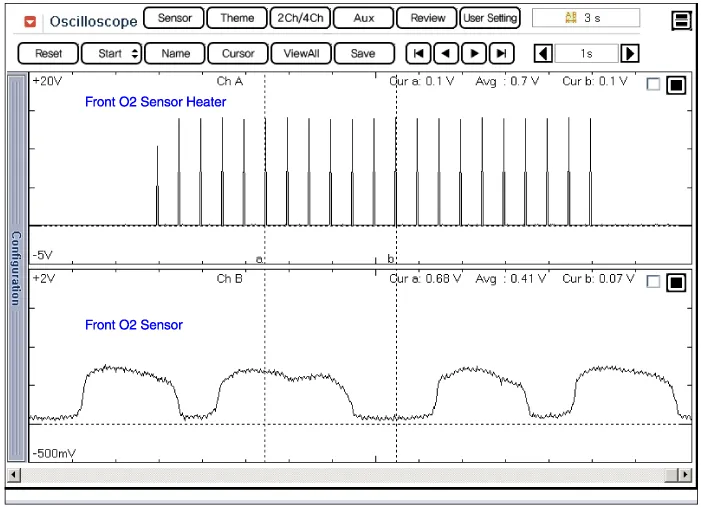
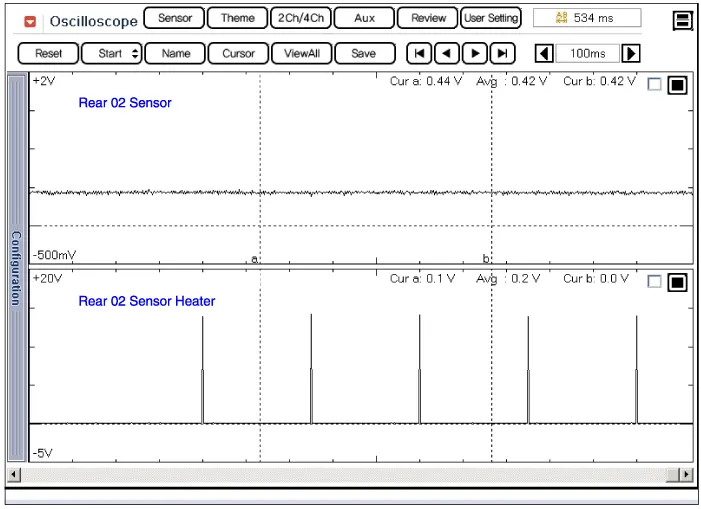
Specification A/F Ratio (?)Output Voltage(V)RICHMin. 0.8LEANMax. 0.1 ItemSpecificationHeater Resistance (?)3.0 ~ 4.1 [20
Circuit Diagram
Other information:
Hyundai Genesis (DH) 2013-2016 Service Manual: Components and Components Location
C
Hyundai Genesis (DH) 2013-2016 Service Manual: Ambient Temperature Sensor Description and Operation
Description The ambient temperature sensor is located inside the side mirror and detects ambient air temperature. It is a negative type thermistor; resistance will increase with lower temperature, and decrease with higher temperature. The sensor output will be used for discharge temperature control, temperature regulation door control,
Categories
- Manuals Home
- Hyundai Genesis Owners Manual
- Hyundai Genesis Service Manual
- Starter Repair procedures
- Description and Operation
- Repair procedures
- New on site
- Most important about car

Copyright В© 2026 www.hgenesisdh.com - 0.028