Hyundai Genesis (DH): Fuel Delivery System / Fuel Pump Repair procedures

Removal
1.
Release the residual pressure in fuel line.
(Refer to Fuel Delivery System - "Release Residual Pressure in Fuel Line")
2.
Fold the rear seat cushion.
3.
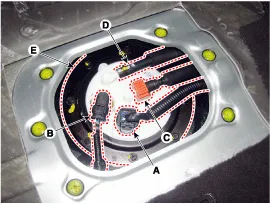
Remove the fuel pump service cover (A) at both the highest (H) and lowest (L) float level.

4.
Disconnect the fuel pump connector (A) and fuel pressure connector (B).
5.
Disconnect the fuel feed tube quick-connector (C) and the suction hose (D).
6.
Remove the fuel pump plate cover (E) after loosening installation bolts, and then remove the fuel pump.

Installation
1.
To install, reverse the removal procedure.

Fuel pump plate cover installation bolt :
2.0 ~ 2.9 N.m (0.2 ~ 0.3 kgf.m, 1.4 ~ 2.2 lbf.ft)

   
When installing the fuel pump module, be careful not to get the seal-ring entangled.
Inspection
[Fuel sender]
1.
Turn ignition switch OFF and disconnect the negative (-)battery cable.
2.
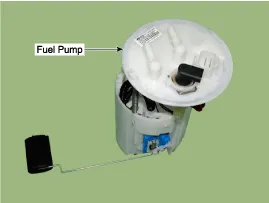
Remove the fuel pump assembly.
(Refer to Fuel Delivery System - "Fuel Pump")
3.
Using an ohmmeter, measure the resistance between terminals 5 and 6 of sender connector (A) at each float level.

Pin No.
Description
1
Fuel pump (U) phase control
2
Fuel pump (V) phase control
3
Fuel pump (W) phase control
4
Ground
5
Fuel sender signal
6
Fuel sender ground

4.
Check that the resistance is within the specification.
Position
Resistance (?)
Capacity (?)
L
81.6 ~ 83.6
6
 1/2
3 ~ 5
38
H
3 ~ 5
73


    Removal 1. Release the residual pressure in fuel line. (Refer to Fuel Delivery System - "Release Residual Pressure in Fuel Line") 2. Turn the ignition switch OFF and disconnect the negative (-) battery cable.

    Removal 1. Release the residual pressure in fuel line. (Refer to Fuel Delivery System - "Release Residual Pressure in Fuel Line") 2. Fold the rear seat cushion.

    Other information:

    Hyundai Genesis (DH) 2013-2016 Service Manual: Auto Light Sensor Components and Components Location

    C

    Hyundai Genesis (DH) 2013-2016 Service Manual: Heater & A/C Control Unit Repair procedures

    Self Diagnosis 1. Self-diagnosis process 2. How to read self-diagnostic code After the display panel blinks three times every 0.5 second, the corresponding fault code blinks on the setup temperature display panel every 0.5 second and will show two figures.

    Categories

     
    Copyright В© 2026 www.hgenesisdh.com - 0.0259