
Hyundai Genesis (DH): AVN System / Front LCD monitor Components and Components Location
| Components |
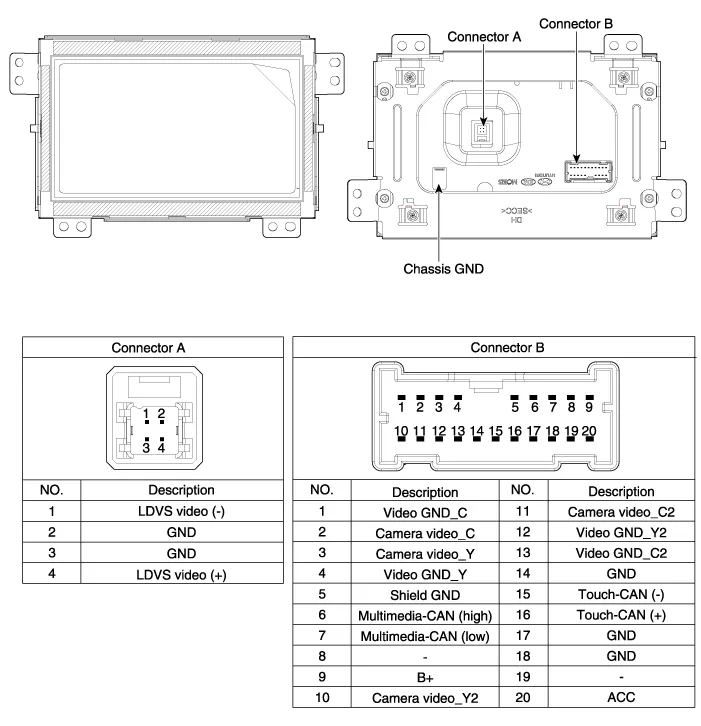
Removal - Take care not to scratch the crash pad and related parts. - Eject all discs before removing the AVN head unit not to damage the DVD player
Removal Take care not to scratch the crash pad and related parts. 1. Disconnect the negative (-) battery terminal. 2. Remove the crash pad side garnish assembly.
Other information:
Hyundai Genesis (DH) 2013-2016 Service Manual: High Mounted Stop Lamp Repair procedures
Removal High Mounted Stop Lamp 1. Disconnect the negative (-) battery terminal. 2. Remove the roof trim assembly. (Refer to Body - "Roof Trim") 3. Remove the high mounted stop lamp assembly (A) after loosening the mounting screws. Installation 1.
Hyundai Genesis (DH) 2013-2016 Service Manual: Blower Motor Repair procedures
Inspection 1. Connect the battery voltage and check the blower motor rotation. 2. If the blower motor does not operate well, replace it with a genuine blower motor check for proper operation. 3. Replace the blower motor if it is proved that there is a problem with it.
Categories
- Manuals Home
- Hyundai Genesis Owners Manual
- Hyundai Genesis Service Manual
- Repair procedures
- Components and Components Location
- Emission Control System
- New on site
- Most important about car
