
Hyundai Genesis (DH): AVN System / Components and Components Location
| Component Location |
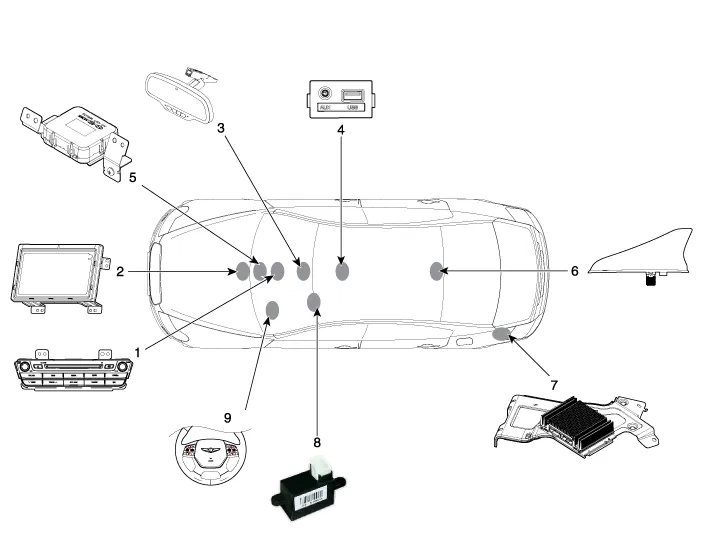
| 1. AVN head unit 2. Front LCD Monitor 3. Blue Link keypad (blue link) 4. Multimedia jack 5. WI - FI antenna | 6. Roof antenna 7. External amplifier 8. Hands-free mic (Built - in overhead console) 9. Steering wheel remote control (SWRC) |
Description AVN system The AVN system has improved information search and easiness of manipulation for the driver by simplifying the system operation experience and unifying the display of the user information such as multimedia, air-conditioning and car information.
Other information:
Hyundai Genesis (DH) 2013-2016 Service Manual: In-car Sensor Description and Operation
Description An in-car air temperature sensor is located in the crash pad lower panel. The sensor contains a thermistor which measures the temperature of the cabin. The signal determined by the resistance value which changes in accordance with perceived inside temperature, is delivered to the heater control unit and according to this signa
Hyundai Genesis (DH) 2013-2016 Service Manual: Photo Sensor Description and Operation
Description The photo sensor is located in the right side of the inside rearview mirror. he integrated rain sensor is located in the right side of the inside rearview mirror. The integrated rain sensor is a multifunctional sensor which combines the photo sensor and auto light sensor, and has a built-in photovoltaic diode (for detecting t
Categories
- Manuals Home
- Hyundai Genesis Owners Manual
- Hyundai Genesis Service Manual
- Active Air Flap(AAF) Repair procedures
- Brake System
- Starter Repair procedures
- New on site
- Most important about car
