
Hyundai Genesis (DH): Parking Guide System (PGS) / Components and Components Location
Hyundai Genesis (DH) 2013-2016 Service Manual / Body Electrical System / Parking Guide System (PGS) / Components and Components Location
| System Diagram |
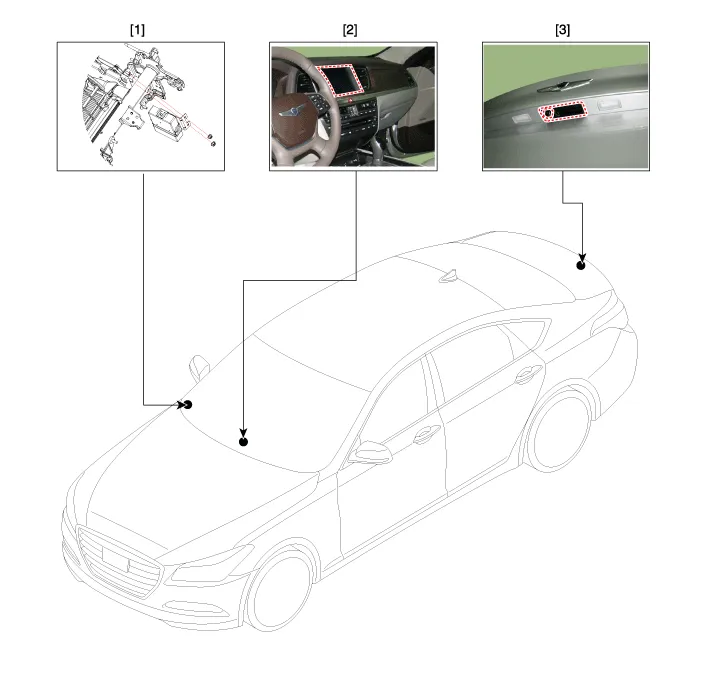
| 1. PGS Unit 2. AVN monitor (LCD) | 3. Rear view camera |
Description Control Function This system supports 2 kinds of main function. (Rear video display function, Expected trace of wheels display function) The Rear video display and the expected trace of wheels display operate according to Vehicle speed condition and Gear position.
Other information:
Hyundai Genesis (DH) 2013-2016 Service Manual: Components and Components Location
C
Hyundai Genesis (DH) 2013-2016 Service Manual: Heater Unit Components and Components Location
Component Location Components (1) 1. Shower duct (Left)2. Mode actuator (LH)3. Temperature control actuator (LH)4. Temperature door lever (Left)5. Mode actuator (A)6. Console temperature actuator (A)7. Console mode actuator ON/OFF8. Heater case (Left)9.
Categories
- Manuals Home
- Hyundai Genesis Owners Manual
- Hyundai Genesis Service Manual
- Description and Operation
- Engine Electrical System
- General Information
- New on site
- Most important about car

Copyright В© 2026 www.hgenesisdh.com - 0.0364