
Hyundai Genesis (DH): Head Up Display System / Components and Components Location
Hyundai Genesis (DH) 2013-2016 Service Manual / Body Electrical System / Head Up Display System / Components and Components Location
| Components Location |
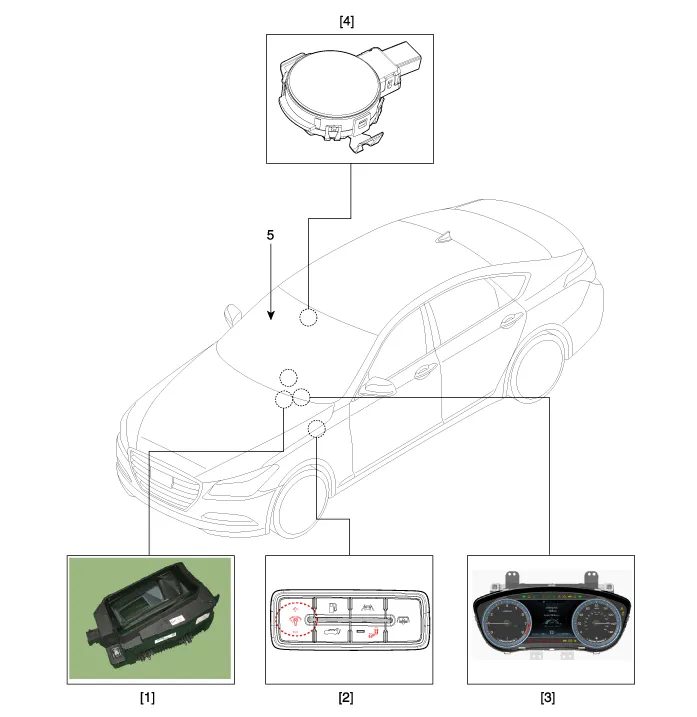
| 1. Head Up Display (HUD) 2. Rheostat switch 3. Cluster | 4. Light sensor 5. Windshield glass (Wedge film applied) |
Description 1. System operation HUD system displays various information on the windshield glass which minimizes the driver
Other information:
Hyundai Genesis (DH) 2013-2016 Service Manual: Condenser Repair procedures
Inspection 1. Check the condenser fins for clogging and damage. If they are clogged, clean them with water, and blow them with compressed air. If they are bent, gently bend them using a screwdriver or pliers. 2. Check the condenser connections for leakage, and repair or replace it, if required.
Hyundai Genesis (DH) 2013-2016 Service Manual: CO2 Sensor Repair procedures
R
Categories
- Manuals Home
- Hyundai Genesis Owners Manual
- Hyundai Genesis Service Manual
- Transmission Control Module (TCM) Repair procedures
- Body Electrical System
- Emission Control System
- New on site
- Most important about car

Copyright В© 2026 www.hgenesisdh.com - 0.0355