
Hyundai Genesis (DH): Cooling System / Active Air Flap(AAF) Schematic Diagrams
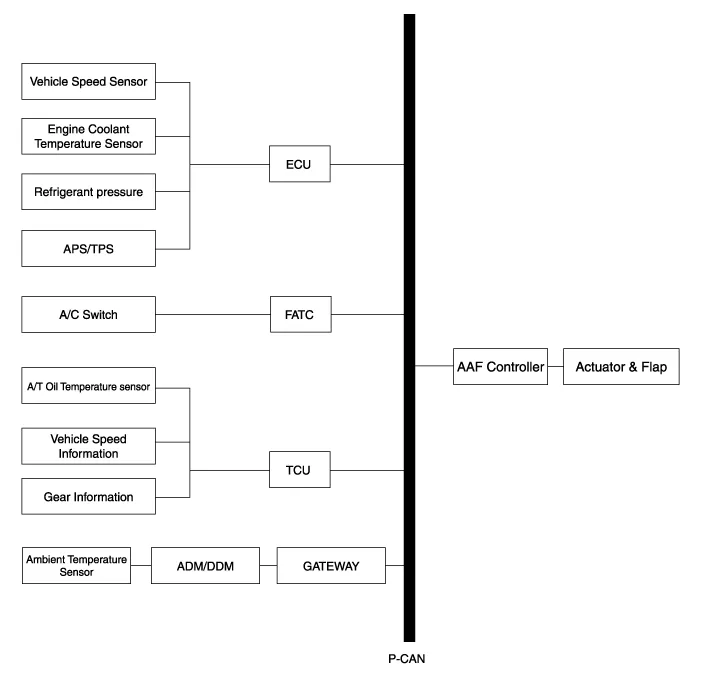
| Schematic Diagram |
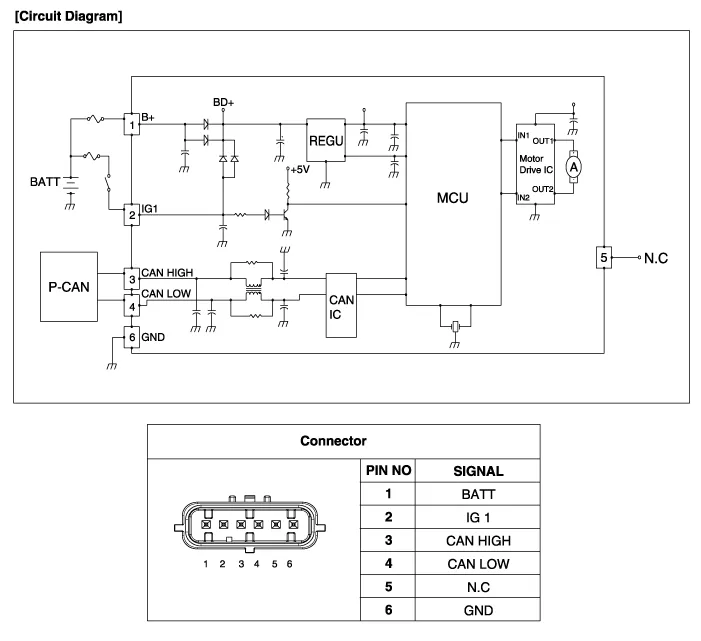
| Circuit Diagram |
Components 1. Active air housing2. Active air flap3. Active air link4. Active air actuator5. Active air duct6. Active air actuator cover
Removal and Installation 1. Disconnect the battery "-" terminal from the trunk room. 2. Remove the front bumper. (Refer to Body - "Front Bumper Cover") 3.
Other information:
Hyundai Genesis (DH) 2013-2016 Service Manual: PGS Unit (Back & Blinde Unit) Repair procedures
Removal 1. Disconnect the negative (-) battery terminal. 2. Remove the glove box housing (A). (Refer to Body - "Glove Box") 3. Remove the PGS unit (A) after loosening the nuts. Installation 1. Install the PGS unit. 2. Install the glove box housing.
Hyundai Genesis (DH) 2013-2016 Service Manual: Cluster Ionizer Repair procedures
Inspection 1. Press the MODE switch more than 4 times within 2 seconds while pressing the OFF switch. DisplayFail description00Normal51Cluster ion generator fault * For diagnostic procedure, refer to DTC guide. Replacement 1. Disconnect the negative (-) battery terminal.
Categories
- Manuals Home
- Hyundai Genesis Owners Manual
- Hyundai Genesis Service Manual
- Suspension System
- Active Air Flap(AAF) Repair procedures
- Engine Mechanical System
- New on site
- Most important about car
