
Hyundai Genesis (DH): Cruise Control System / Troubleshooting
Hyundai Genesis (DH) 2013-2016 Service Manual / Engine Electrical System / Cruise Control System / Troubleshooting
| Trouble Symptom Charts |
| Trouble Symptom 1 |
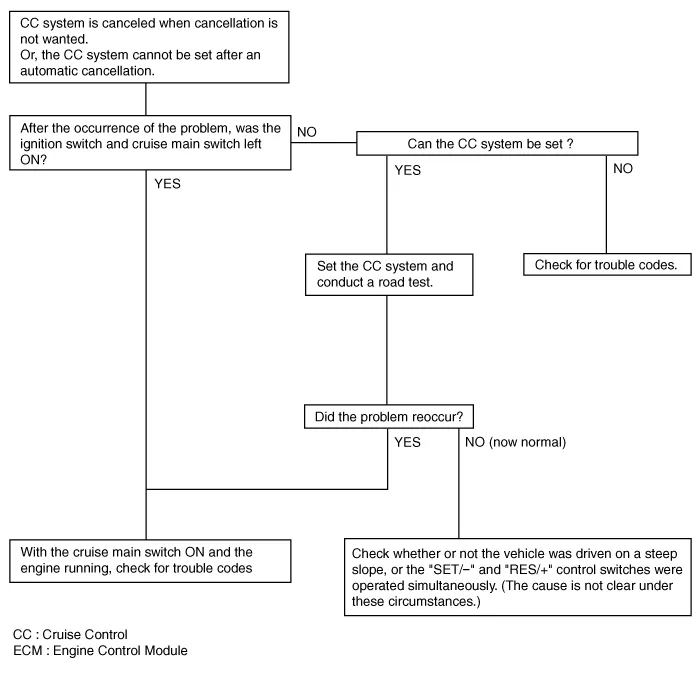
| Trouble Symptom 2 |
| Trouble symptom | Probable cause | Remedy |
| The set vehicle speed turns too high or low. "Surging" (repeated alternating acceleration and deceleration) occurs after setting | Malfunction of the vehicle speed sensor circuit | Repair the vehicle speed sensor system, or replace the part |
| Malfunction of ECM | Check input and output signals at ECM |
| Trouble Symptom 3 |
| Trouble symptom | Probable cause | Remedy |
| The CC system is not canceled when the brake pedal is depressed | Damaged or disconnected wiring of the brake pedal switch | Repair the harness or replace the brake pedal switch |
| Malfunction of the ECM signals | Check input and output signals at ECM |
| Trouble Symptom 4 |
| Trouble symptom | Probable cause | Remedy |
| The CC system is not canceled when the shift lever moves to the
"N" position (It is canceled, however, when the brake pedal is
depressed) | Damaged or disconnected wiring of inhibitor switch input circuit | Repair the harness, or repair or replace the inhibitor switch |
| Improper adjustment of inhibitor switch |
| Malfunction of the ECM signals | Check input and output signals at ECM |
| Trouble Symptom 5 |
| Trouble symptom | Probable cause | Remedy |
| Cannot decelerate (coast) by using the "SET/ |
System Block Diagram Component Parts And Function Outline Component partFunctionVehicle-speed sensor, ESP/ABS Control ModuleConverts vehicle speed to pulse.
Circuit Diagram
Other information:
Hyundai Genesis (DH) 2013-2016 Service Manual: Specifications
S
Hyundai Genesis (DH) 2013-2016 Service Manual: Auto Defogging Sensor Description and Operation
Description The auto defogging sensor is installed on the front window glass. The sensor judges and sends signal if moisture occurs to blow out wind for defogging. The air conditioner control module receives signal from the sensor and restrains moisture and eliminate defog by controlling the intake actuator, A/C, auto defogging actuator,
Categories
- Manuals Home
- Hyundai Genesis Owners Manual
- Hyundai Genesis Service Manual
- Suspension System
- Body (Interior and Exterior)
- Components and Components Location
- New on site
- Most important about car

Copyright В© 2026 www.hgenesisdh.com - 0.0425