
Hyundai Genesis (DH): Blind Spot Detection system / Repair procedures
| Diagnosis With GDS |
| 1. |
BSD system defects can be quickly diagnosed with the GDS. GDS
operates actuator quickly to monitor, input/output value and self
diagnosis. |
| 2. |
Connect the cable of GDS to the data link connector in driver side crash pad lower panel, and turn on the GDS. |
| 3. |
Select the vehicle model and then BSD system. |
| 4. |
Select "Input/output monitoring", if you want to check current data of BSD system.
|
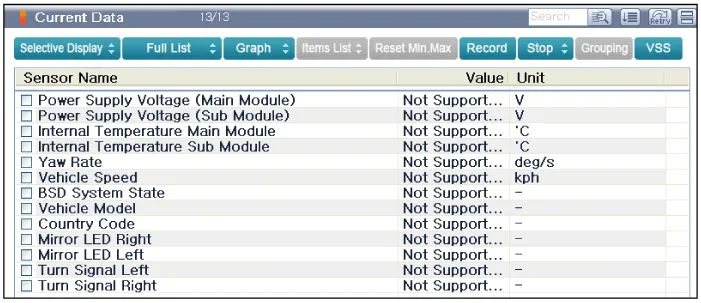
| 5. |
If you want to check each module operation forcefully, select "Actuation test".
|
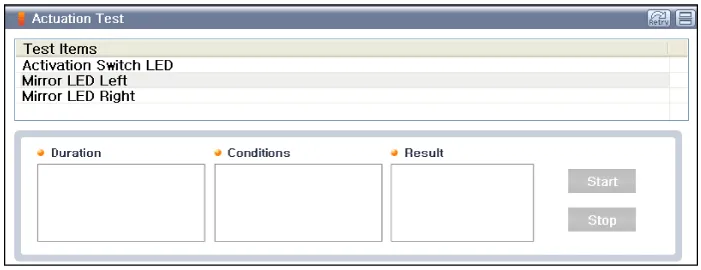
Description BSD is a system that measures the speed of and distance from the following vehicles by using two magnetic wave radar sensors attached to the rear bumper, and detects any vehicle within the blind spot zone and gives off alarm (visual and auditory).
Circuit Diagram
Other information:
Hyundai Genesis (DH) 2013-2016 Service Manual: Rear Combination Lamp Repair procedures
Removal 1. Disconnect the negative (-) battery terminal. 2. After loosening the nuts (4EA) holding the rear combination lamp and disconnecting the connector (A), remove the outside rear combination lamp assembly. 3. Remove the bulb (A) after turning it in the counter clock-wise direction.
Hyundai Genesis (DH) 2013-2016 Service Manual: Description and Operation
Description Control Function This system supports 2 kinds of main function. (Rear video display function, Expected trace of wheels display function) The Rear video display and the expected trace of wheels display operate according to Vehicle speed condition and Gear position.
Categories
- Manuals Home
- Hyundai Genesis Owners Manual
- Hyundai Genesis Service Manual
- Evaporative Emission Control System
- General Information
- Components and Components Location
- New on site
- Most important about car
