
Hyundai Genesis (DH): Air Conditioning System / Photo Sensor Description and Operation
Hyundai Genesis (DH) 2013-2016 Service Manual / Heating, Ventilation and Air Conditioning / Air Conditioning System / Photo Sensor Description and Operation
| Description |
The photo sensor is located in the right side of the inside rearview mirror.
he integrated rain sensor is located in the right side of the
inside rearview mirror. The integrated rain sensor is a multifunctional
sensor which combines the photo sensor and auto light sensor, and has a
built-in photovoltaic diode (for detecting the amount of solar
radiation). The electromotive force, which is generated in proportion to
the detected radiation quantity, is transferred to the automatic
temperature control module to compensate air flow and discharge
temperature in the air conditioning system.
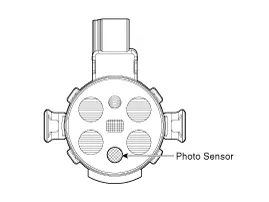
Inspection 1. Turn the ignition switch ON. 2. Blow warm air into the in-car sensor air inlet. Measure the sensor resistance between 1 and 3 terminals.
Inspection 1. Turn the ignition switch ON. 2. Connect the GDS. 3. Emit intensive light toward the photo sensor using a lamp, and check the output voltage change.
Other information:
Hyundai Genesis (DH) 2013-2016 Service Manual: Auto Head Lamp Leveling Unit Description and Operation
Description According to driving environment and loading state of vehicle, head lamp lighting direction is changed to keep the driver's visibility range and to protect the driver's vision from glare, aiming at safety driving. Sensor integrated ECU mounting on the rear center arm drives the actuator mounting on the head lamp since sens
Hyundai Genesis (DH) 2013-2016 Service Manual: Description and Operation
D
Categories
- Manuals Home
- Hyundai Genesis Owners Manual
- Hyundai Genesis Service Manual
- Emission Control System
- Evaporative Emission Control System
- Repair procedures
- New on site
- Most important about car

Copyright В© 2026 www.hgenesisdh.com - 0.0386