
Hyundai Genesis (DH): Parking Guide System (PGS) / PGS Unit (Back & Blinde Unit) Repair procedures
| Removal |
| 1. |
Disconnect the negative (-) battery terminal. |
| 2. |
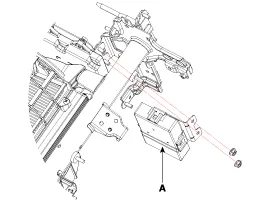
Remove the glove box housing (A).
(Refer to Body - "Glove Box") |
| 3. |
Remove the PGS unit (A) after loosening the nuts.
|
| Installation |
| 1. |
Install the PGS unit. |
| 2. |
Install the glove box housing. |
| 3. |
Connector the negative (-) battery terminal. |
Circuit Diagram Input / Output Terminal Voltage No.SignalDescriptionlevel1ACCACCOFF(Less than 1V), ON(More than 8V)4C-CAN-LHigh Speed CAN low-11V-OUTVideo Out-13IGNIGN SignalON(More than 9V) / OFF(Less than 1V)16C-CAN-HHigh Speed CAN high-18GND-RRear Camera GND-19REAR-POWERVCC-REARON(6~7V) / OFF(Less than 1V)20V-IN-RRear Video Input-20VGND-RRear Video Gnd-22SERIAL LINETop View Control-24VGNDVideo Out GND-
Other information:
Hyundai Genesis (DH) 2013-2016 Service Manual: LKAS Unit Repair procedures
Removal 1. Disconnect the negative (-) battery terminal. 2. Remove the mirror wiring cover (A) and rain sensor cover (B). 3. Remove the LKAS unit connector (A). 4. Remove the LKAS unit after disengaging the mounting bracket (A). Installation 1.
Hyundai Genesis (DH) 2013-2016 Service Manual: Auto Defogging Actuator Repair procedures
Inspection 1. Turn the ignition switch OFF. 2. Disconnect the auto defogging connector. 3. Verify that the auto defogging actuator operates to the open position when connecting 12V to terminal 3 and grounding terminal 4. Verify that the auto defogging actuator operates to the close position when connected in reverse.
Categories
- Manuals Home
- Hyundai Genesis Owners Manual
- Hyundai Genesis Service Manual
- Description and Operation
- Engine Mechanical System
- Emission Control System
- New on site
- Most important about car
