
Hyundai Genesis (DH): Smart Cruise Control System / Schematic Diagrams
| Trouble Symptom Charts |
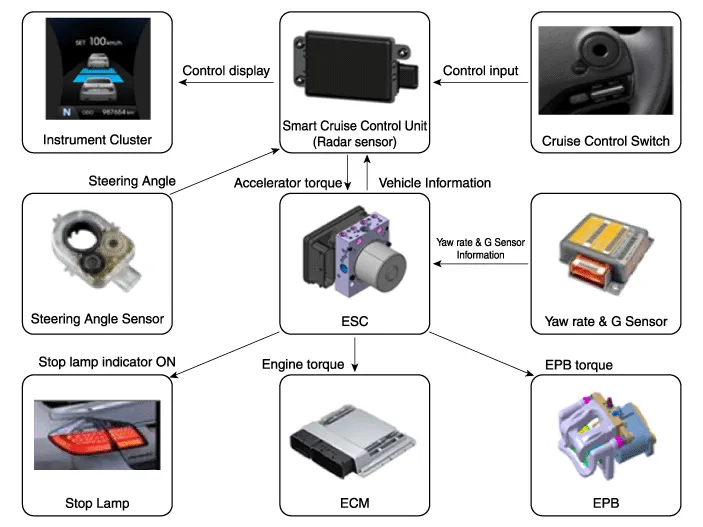
| Component part | Function |
| Cruise Control Switch | Input the set speed and distance to the SCC ECU. |
| Instrument Cluster | Display various information inputted from SCC. |
| Smart Cruise Control Unit | Recognize and track the vehicle ahead. Calculate the target speed and distance Request the acceleration and retardation to ESP |
| VDC (HECU) | Perform automatic braking and request the engine torque control to the engine (ECM) Request to turn the stop lamp indicator ON |
| Engine (ECM) | Control the engine torque |
| Electronic Parking Brake (EPB) | Control the EPB torque |
| Stop lamp | Turn the stop lamp indicator ON |
General Safety Information and Caution Be careful of the following precautions when driving the vehicle using the smart cruise control system.
Description The smart cruise control system allows a driver to program the vehicle to control the speed and following distance by detecting the vehicle ahead without depressing the brake pedal and the accelerator pedal.
Other information:
Hyundai Genesis (DH) 2013-2016 Service Manual: Front Fog Lamps Repair procedures
Removal 1. Disconnect the negative (-) battery terminal. 2. Remove the front bumper. (Refer to Body - "Front Bumper Cover") 3. Disconnect the front fog lamp connector (A). 4. Remove the front fog lamp assembly (A) after loosening the mounting nut.
Hyundai Genesis (DH) 2013-2016 Service Manual: CO2 Sensor Description and Operation
Description This system maintains the density of carbon dioxide constantly in vehicle interior by measuring the amount of carbon dioxide to increase the comfortableness and the fuel consumption rate when air conditioning system is operating.
Categories
- Manuals Home
- Hyundai Genesis Owners Manual
- Hyundai Genesis Service Manual
- Description and Operation
- Body Electrical System
- Repair procedures
- New on site
- Most important about car
