
Hyundai Genesis (DH): IMS(Integrated Memory System) / Memory power seat unit Repair procedures
Hyundai Genesis (DH) 2013-2016 Service Manual / Body Electrical System / IMS(Integrated Memory System) / Memory power seat unit Repair procedures
| Removal |
| 1. |
Disconnect the negative (-) battery terminal. |
| 2. |
Remove the front seat.
(Refer to Body - "Front Seat Assembly") |
| 3. |
Driver settings menu (USM) is Off,
|
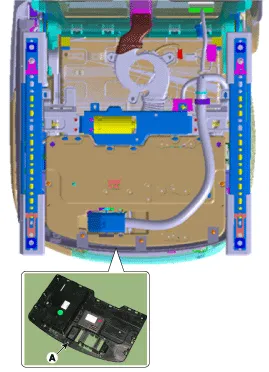
| 4. |
Loosen the mounting screws (2) and remove the IMS unit (A).
|
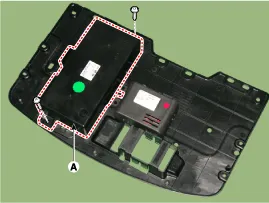
| Installation |
| 1. |
Install the memory power seat unit. |
| 2. |
Install the front sheet inner cover . |
| 3. |
Install the Driver's seat assembly. |
| 4. |
Connect the negative (-) battery terminal. |
Circuit Diagram
Other information:
Hyundai Genesis (DH) 2013-2016 Service Manual: PGS Unit (Back & Blinde Unit) Schematic Diagrams
C
Hyundai Genesis (DH) 2013-2016 Service Manual: Cluster Ionizer Repair procedures
Inspection 1. Press the MODE switch more than 4 times within 2 seconds while pressing the OFF switch. DisplayFail description00Normal51Cluster ion generator fault * For diagnostic procedure, refer to DTC guide. Replacement 1. Disconnect the negative (-) battery terminal.
Categories
- Manuals Home
- Hyundai Genesis Owners Manual
- Hyundai Genesis Service Manual
- Evaporative Emission Control System
- Body (Interior and Exterior)
- Description and Operation
- New on site
- Most important about car

Copyright В© 2026 www.hgenesisdh.com - 0.0265