
Hyundai Genesis (DH): Premium AVN System / Front LCD monitor Components and Components Location
| Components |
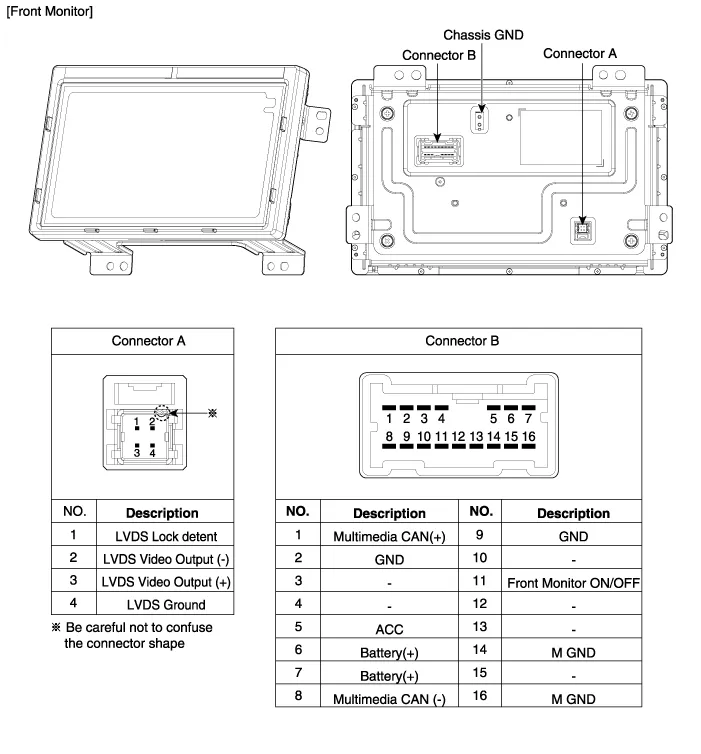
Removal - Take care not to scratch the crash pad and related parts. - Eject all discs before removing the AVN head unit not to damage the DVD player
Removal Take care not to scratch the crash pad and related parts. 1. Disconnect the negative (-) battery terminal. 2. Remove the crash pad side garnish assembly.
Other information:
Hyundai Genesis (DH) 2013-2016 Service Manual: Components and Components Location
Component Location Index Engine Room [Lambda Engine] 1. Expansion Valve2. Suction & Liquid Tube Assembly3. Service Port (Low Pressure)4. Service Port (High Pressure)5. A/C Pressure Transducer (APT)6. Compressor7. Condenser8. Receiver-drier [Tau Engine] 1.
Hyundai Genesis (DH) 2013-2016 Service Manual: Receiver-Drier Repair procedures
Replacement 1. Remove the condenser. 2. Remove the cap (B) on the bottom of the condenser with the L wrench (A). Tightening torque : 9.81 ~ 14.71 N.m (1.0 ~ 1.5 kgf.m, 7.2 ~ 10.8 lb-ft) 3. Remove the receiver-drier (A) from condenser using a long nose plier.
Categories
- Manuals Home
- Hyundai Genesis Owners Manual
- Hyundai Genesis Service Manual
- General Information
- Parking Assist Sensor Repair procedures
- Description and Operation
- New on site
- Most important about car
