
Hyundai Genesis (DH): Auto Lighting Control System / Auto Light Sensor Components and Components Location
Hyundai Genesis (DH) 2013-2016 Service Manual / Body Electrical System / Auto Lighting Control System / Auto Light Sensor Components and Components Location
| Components and Components Location |
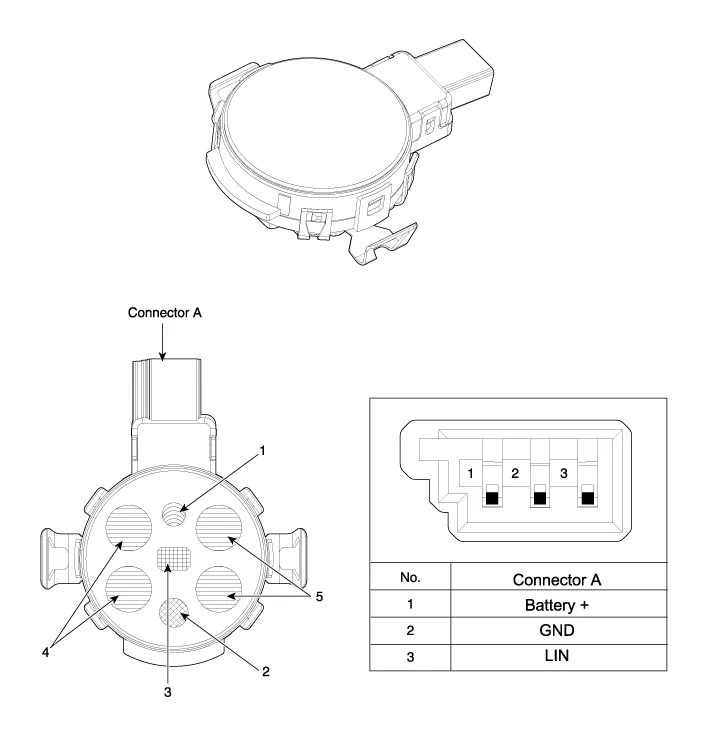
| 1. Horizontal light sensor 2. Vertical light sensor 3. Solar load sensor | 4. Rain sensor - left 5. Rain sensor - right |
Description Integrated Rain Sensor Integrated rain sensor (A) controls three systems: front wiper, auto-light, and central air conditioner. 1. Wiper Control System When "AUTO" switch signal is received from the multi-function switch on the right, the integrated rain sensor detects the amount of rainfall.
Removal 1. Disconnect the negative (-) battery terminal. 2. Remove the photo & auto light sensor. (Refer to Windshield Wiper/Washer - "Rain Sensor") Installation 1.
Other information:
Hyundai Genesis (DH) 2013-2016 Service Manual: Console Temperature Control Actuator Repair procedures
Inspection 1. Turn the ignition switch OFF. 2. Disconnect the console temperature control actuator connector. 3. Verify that the console temperature control actuator operates to the defrost mode when connecting 12V to terminal 3 and grounding terminal 4.
Hyundai Genesis (DH) 2013-2016 Service Manual: Blower Unit Repair procedures
R
Categories
- Manuals Home
- Hyundai Genesis Owners Manual
- Hyundai Genesis Service Manual
- Electric Parking Brake (EPB) Repair procedures
- General Information
- Parking Assist Sensor Repair procedures
- New on site
- Most important about car

Copyright В© 2026 www.hgenesisdh.com - 0.0337