Hyundai Genesis (DH): Front Driveshaft Assembly / Front Driveshaft Repair procedures

Removal
1.
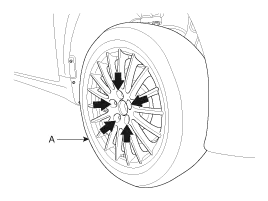
Loosen the wheel nuts slightly. Raise the vehicle, and make sure it is securely supported.
2.
Remove the front wheel and tire (A) from the front hub.

   
Be careful not to damage the hub bolts when removing the front wheel and tire.
3.
Remove the brake caliper assembly.
(Refer to Brake System - "Front Disc Brake")
4.
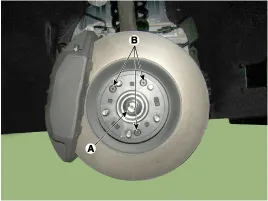
Loosen the driveshaft caulking nut (A) and then remove the brake disc by loosening the screw (B-3EA).

Tightening torque
A : 274.6 ~ 294.2 N.m (28.0 ~ 30.0 kgf.m, 202.5 ~ 217.1 lb-ft)
B : 4.9 ~ 5.9 N.m (0.5 ~ 0.6 kgf.m, 3.6 ~ 4.3 lb-ft)


    Components 1. Front driveshaft (LH)2. Inner shaft bearing bracket3. Front driveshaft (RH)

    Other information:

    Hyundai Genesis (DH) 2013-2016 Service Manual: LKAS Unit Repair procedures

    Removal 1. Disconnect the negative (-) battery terminal. 2. Remove the mirror wiring cover (A) and rain sensor cover (B). 3. Remove the LKAS unit connector (A). 4. Remove the LKAS unit after disengaging the mounting bracket (A). Installation 1.

    Hyundai Genesis (DH) 2013-2016 Service Manual: Photo Sensor Description and Operation

    Description The photo sensor is located in the right side of the inside rearview mirror. he integrated rain sensor is located in the right side of the inside rearview mirror. The integrated rain sensor is a multifunctional sensor which combines the photo sensor and auto light sensor, and has a built-in photovoltaic diode (for detecting t

    Categories

     
    Copyright В© 2026 www.hgenesisdh.com - 0.0277