
Hyundai Genesis (DH): Engine Control System / CVVT Oil Control Valve (OCV) Troubleshooting
Hyundai Genesis (DH) 2013-2016 Service Manual / Engine Control / Fuel System / Engine Control System / CVVT Oil Control Valve (OCV) Troubleshooting
| Signal Waveform |

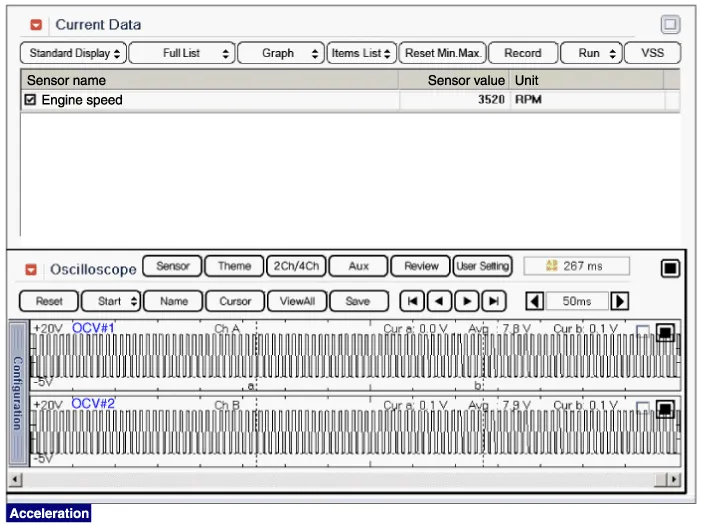
Specification ItemSpecificationCoil Resistance (?)6.9 ~ 7.9 [20
Circuit Diagram
Other information:
Hyundai Genesis (DH) 2013-2016 Service Manual: Components and Components Location
C
Hyundai Genesis (DH) 2013-2016 Service Manual: Description and Operation
Description Control Function This system supports 2 kinds of main function. (Rear video display function, Expected trace of wheels display function) The Rear video display and the expected trace of wheels display operate according to Vehicle speed condition and Gear position.
Categories
- Manuals Home
- Hyundai Genesis Owners Manual
- Hyundai Genesis Service Manual
- Body Electrical System
- Description and Operation
- Emission Control System
- New on site
- Most important about car

Copyright В© 2026 www.hgenesisdh.com - 0.0254