
Hyundai Genesis (DH): Smart Cruise Control System / Schematic Diagrams
| Trouble Symptom Charts |
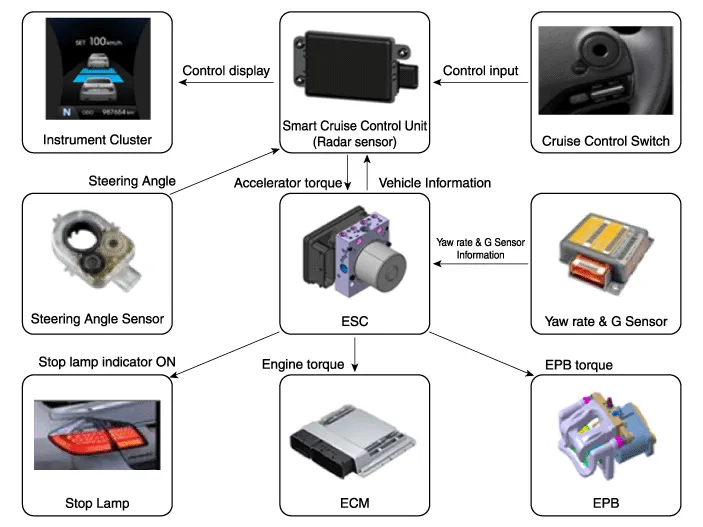
| Component part | Function |
| Cruise Control Switch | Input the set speed and distance to the SCC ECU. |
| Instrument Cluster | Display various information inputted from SCC. |
| Smart Cruise Control Unit | Recognize and track the vehicle ahead. Calculate the target speed and distance Request the acceleration and retardation to ESP |
| VDC (HECU) | Perform automatic braking and request the engine torque control to the engine (ECM) Request to turn the stop lamp indicator ON |
| Engine (ECM) | Control the engine torque |
| Electronic Parking Brake (EPB) | Control the EPB torque |
| Stop lamp | Turn the stop lamp indicator ON |
General Safety Information and Caution Be careful of the following precautions when driving the vehicle using the smart cruise control system.
Description The smart cruise control system allows a driver to program the vehicle to control the speed and following distance by detecting the vehicle ahead without depressing the brake pedal and the accelerator pedal.
Other information:
Hyundai Genesis (DH) 2013-2016 Service Manual: Description and Operation
Description System Overview The System offers the following features: - Changing the state of engine ignition and power by using the start button. - Controlling external relays for ACC / IGN1 / IGN2 terminal switching and STARTER, without use of mechanical ignition switch.
Hyundai Genesis (DH) 2013-2016 Service Manual: Components and Components Location
Component Location Index Engine Room [Lambda Engine] 1. Expansion Valve2. Suction & Liquid Tube Assembly3. Service Port (Low Pressure)4. Service Port (High Pressure)5. A/C Pressure Transducer (APT)6. Compressor7. Condenser8. Receiver-drier [Tau Engine] 1.
Categories
- Manuals Home
- Hyundai Genesis Owners Manual
- Hyundai Genesis Service Manual
- Repair procedures
- Engine Electrical System
- Body Electrical System
- New on site
- Most important about car
