
Hyundai Genesis (DH): Seat Electrical / Lumber Support Units Components and Components Location
Hyundai Genesis (DH) 2013-2016 Service Manual / Body Electrical System / Seat Electrical / Lumber Support Units Components and Components Location
| Component Location |
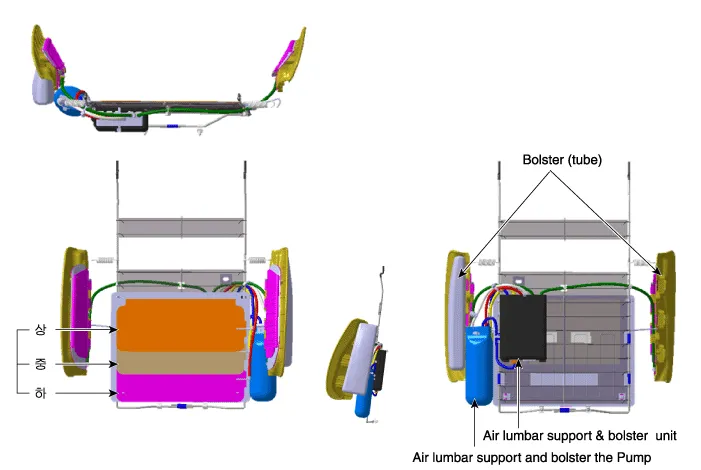
| Air lumbar support & bolster assembly |
| Mechanical lumbar support assembly |
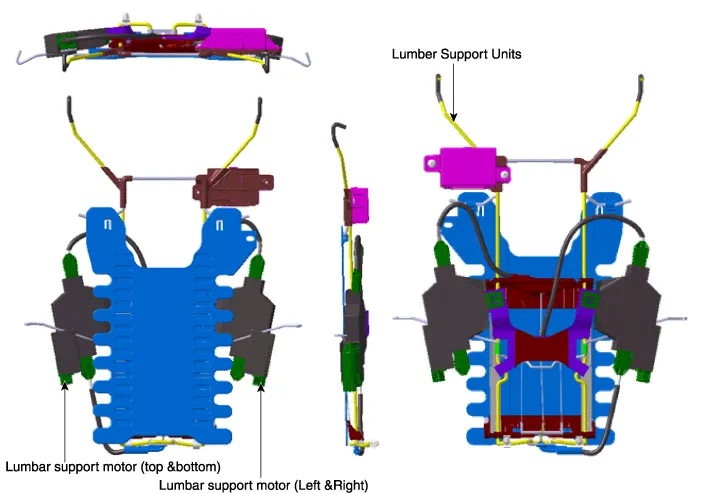
Removal [Front seat - ventilation blower Seat] 1. Disconnect the battery(-) terminals. 2. Remove the front seat. (Refer to Body - "Front Seat Assembly" ) 3.
Removal Air lumbar support and bolster assembly 1. Disconnect the negative (-) battery terminal. 2. Remove the front seat back cover. (Refer to Body - "Front Seat Back Cover") 3.
Other information:
Hyundai Genesis (DH) 2013-2016 Service Manual: Specifications
S
Hyundai Genesis (DH) 2013-2016 Service Manual: Auto Defogging Actuator Description and Operation
Description The auto defogging sensor is installed on front window glass. The sensor judges and sends signal if moisture occurs to blow out wind for defogging. The air conditioner control module receives a signal from the sensor and restrains moisture and eliminates defog by the intake actuator, A/C, auto defogging actuator, blower motor
Categories
- Manuals Home
- Hyundai Genesis Owners Manual
- Hyundai Genesis Service Manual
- Electric Parking Brake (EPB) Repair procedures
- Description and Operation
- Engine Mechanical System
- New on site
- Most important about car

Copyright В© 2026 www.hgenesisdh.com - 0.0358