
Hyundai Genesis (DH): Premium AVN System / AVN(Audio Video Navigation) head unit Components and Components Location
Hyundai Genesis (DH) 2013-2016 Service Manual / Body Electrical System / Premium AVN System / AVN(Audio Video Navigation) head unit Components and Components Location
| Components |
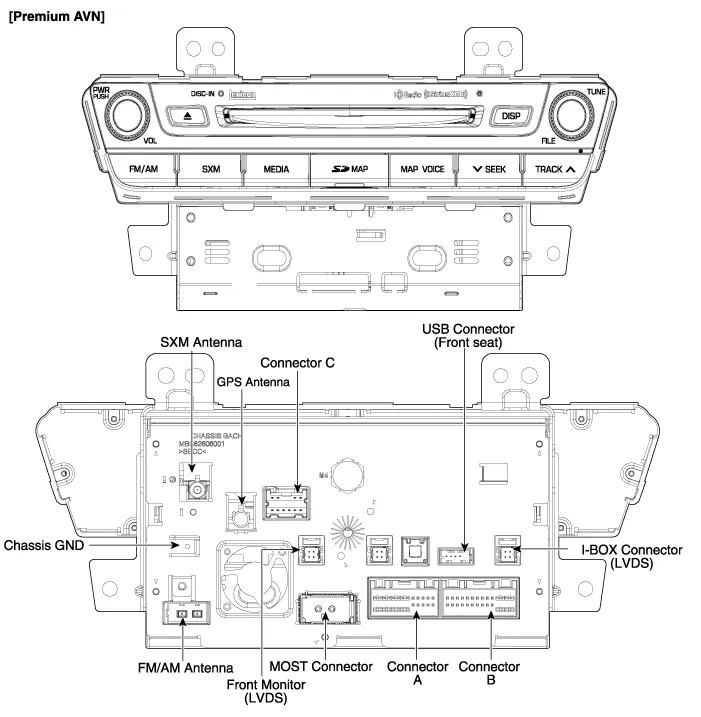
Connector Pin Information
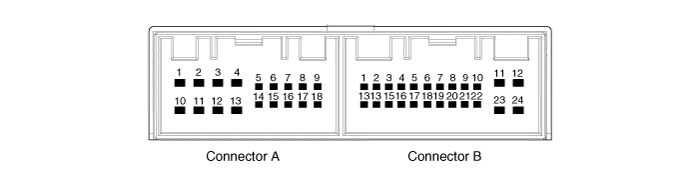
| No. | Connector A | Connector B |
| 1 | - | MM CAN HIGH |
| 2 | Rear seat LCD monitor ON / OFF | - |
| 3 | - | High-speed CAN (+) |
| 4 | - | - |
| 5 | - | AUX video shield GND |
| 6 | - | IGN 1 B(+) |
| 7 | i-BOX microphone (+) | AUX Video |
| 8 | Illumination (+) | AUX R |
| 9 | Reverse | - |
| 10 | i-BOX microphone shield GND | MIC(+) |
| 11 | - | ACC |
| 12 | - | B(+) |
| 13 | - | MM CAN low |
| 14 | Front seat LCD monitor ON / OFF | - |
| 15 | - | High-speed CAN (-) |
| 16 | i-BOX microphone (-) | Vehicle speed |
| 17 | Illumination (-) | Mic shield GND |
| 18 | Antenna B(+) | AUX audio shield GND |
| 19 | ? | AUX video GND |
| 20 | AUX DETECT | |
| 21 | AUX L | |
| 22 | MIC(-) | |
| 23 | M GND | |
| 24 | M GND |
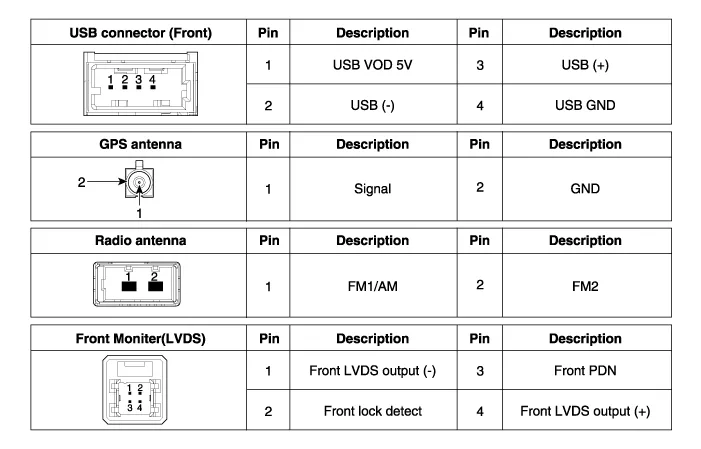
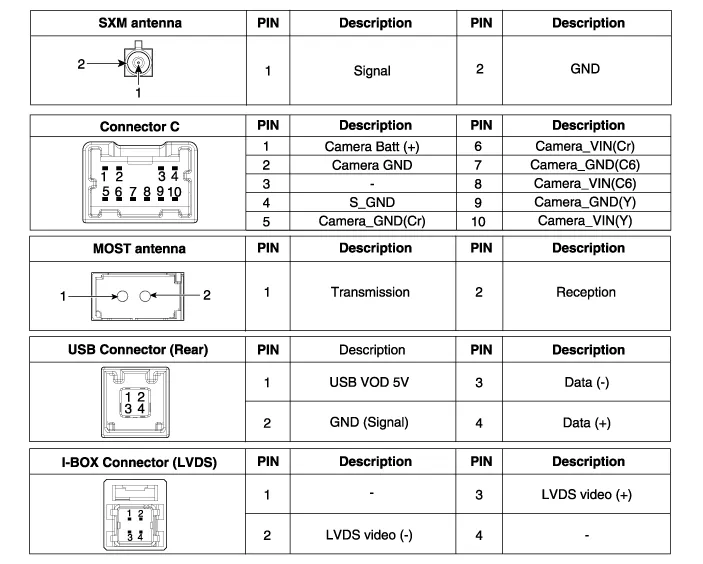
Description Premium AVN system The premium AVN system has improved information search and easiness of manipulation for the driver by simplifying the system operation experience and unifying the display of the user information such as multimedia, air-conditioning and car information.
Removal - Take care not to scratch the crash pad and related parts. - Eject all discs before removing the AVN head unit not to damage the DVD player
Categories
- Manuals Home
- Hyundai Genesis Owners Manual
- Hyundai Genesis Service Manual
- Description and Operation
- Description and Operation
- Evaporative Emission Control System
- New on site
- Most important about car

Copyright В© 2026 www.hgenesisdh.com - 0.028