
Hyundai Genesis (DH): Charging System / Alternator Repair procedures
Hyundai Genesis (DH) 2013-2016 Service Manual / Engine Electrical System / Charging System / Alternator Repair procedures
| Removal |
| 1. |
Turn ignition switch OFF and disconnect the negative (-) battery cable. |
| 2. |
Remove the engine cover. |
| 3. |
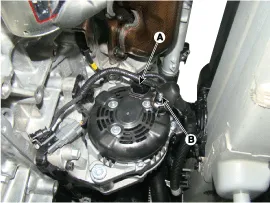
Disconnect the alternator connector (A) and cable (B) from the 'B' terminal.
|
| 4. |
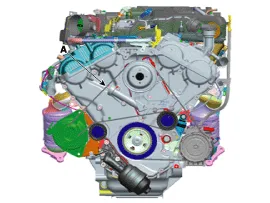
To release the tension, turn the drive belt tensioner counterclockwise and then remove the drive belt (A).
|
| 5. |
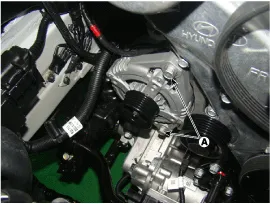
Remove the alternator after removing the mounting bolts (A).
|
| Installation |
| 1. |
Install in the reverse order of removal. |
| 2. |
Adjust the alternator belt tension after installation.
(Refer to Engine Mechanical System - "Drive Belt")
|
Circuit Diagram
Description [AGM Battery] AGM battery is used for especially heavy load on the vehicle network depending on equipment and requirements. AGM stands for Absorbent Glass Material Battery; that is absorbent glass fibre fleece.
Other information:
Hyundai Genesis (DH) 2013-2016 Service Manual: Components and Components Location
S
Hyundai Genesis (DH) 2013-2016 Service Manual: A/C Pressure Transducer Description and Operation
Description The A/C Pressure Transducer (APT) converts the pressure value of high-pressure line into voltage value after measuring it. By converted voltage value, engine ECU controls the cooling fan by operating it at high speed or low speed.
Categories
- Manuals Home
- Hyundai Genesis Owners Manual
- Hyundai Genesis Service Manual
- Components and Components Location
- Description and Operation
- Engine Electrical System
- New on site
- Most important about car

Copyright В© 2026 www.hgenesisdh.com - 0.0253