
Hyundai Genesis (DH): Hands Free System / Hands Free Mic Repair procedures
Hyundai Genesis (DH) 2013-2016 Service Manual / Body Electrical System / Hands Free System / Hands Free Mic Repair procedures
| Inspection |
| 1. |
Disconnect the negative (-) battery terminal. |
| 2. |
Remove the overhead console. |
| 3. |
Remove the handsfree mic (B) after disconnecting the handsfree mic connector (A).
|

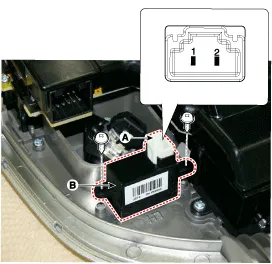
| 4. |
Check the continuity of the Mic between terminals using an ohmmeter.
|

Inspection 1. Check for resistance between terminals in each switch position(LH). [Audio] SwitchConnectorterminalResistance(
Categories
- Manuals Home
- Hyundai Genesis Owners Manual
- Hyundai Genesis Service Manual
- Repair procedures
- Starter Repair procedures
- Restraint
- New on site
- Most important about car

Copyright В© 2026 www.hgenesisdh.com - 0.0404