
Hyundai Genesis (DH): BLUE LINK / Description and Operation
Hyundai Genesis (DH) 2013-2016 Service Manual / Body Electrical System / BLUE LINK / Description and Operation
| Description |
Vehicle information systems (BLUE LINK) based on state-of-the-art IT systems, safety and security
The term "Telematics" is a combination of telecommunication
and informatics. The Telematics system uses an assortment of
communication devices mounted on the vehicle to analyze various vehicle
and driving conditions and keep driving safe and convenient. |

| 1. |
|
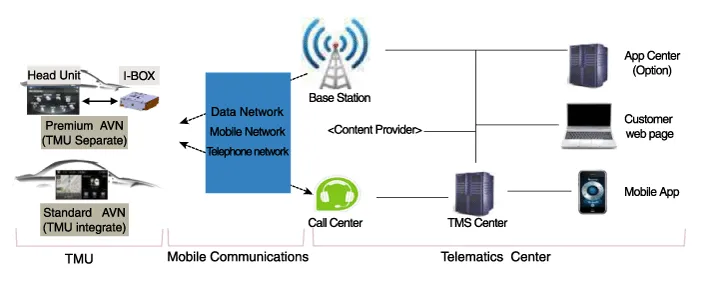
System Block Diagram
Other information:
Hyundai Genesis (DH) 2013-2016 Service Manual: Description and Operation
Description System Overview The System offers the following features: - Changing the state of engine ignition and power by using the start button. - Controlling external relays for ACC / IGN1 / IGN2 terminal switching and STARTER, without use of mechanical ignition switch.
Hyundai Genesis (DH) 2013-2016 Service Manual: Photo Sensor Repair procedures
Inspection 1. Turn the ignition switch ON. 2. Connect the GDS. 3. Emit intensive light toward the photo sensor using a lamp, and check the output voltage change. 4. The voltage will rise with higher intensive light and fall with lower intensive light.
Categories
- Manuals Home
- Hyundai Genesis Owners Manual
- Hyundai Genesis Service Manual
- Repair procedures
- Suspension System
- Engine Mechanical System
- New on site
- Most important about car

Copyright В© 2026 www.hgenesisdh.com - 0.0288