
Hyundai Genesis (DH): Cooling System / Cooling Fan Schematic Diagrams
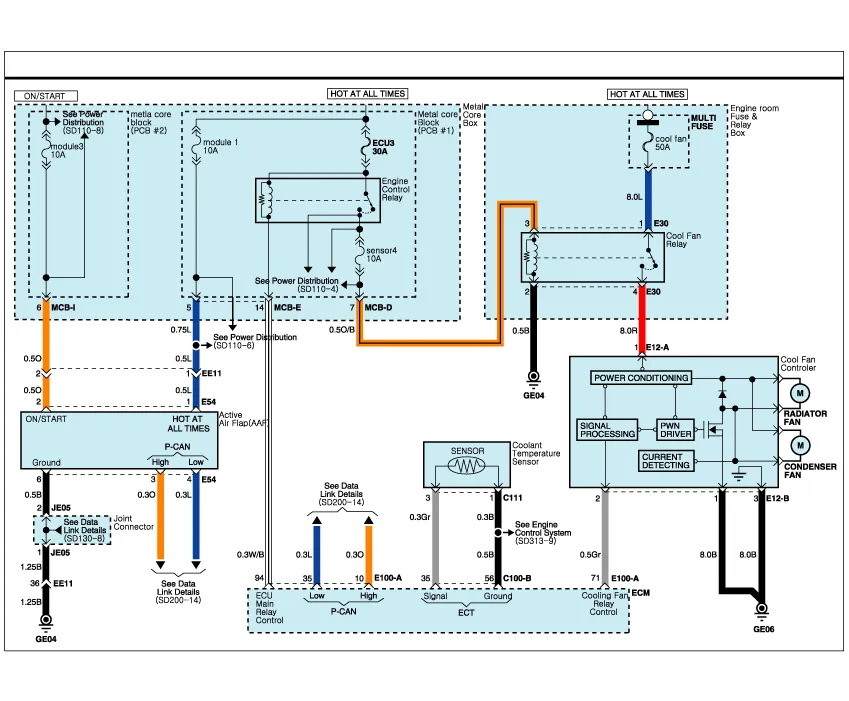
| Cooling Circuit Diagram |
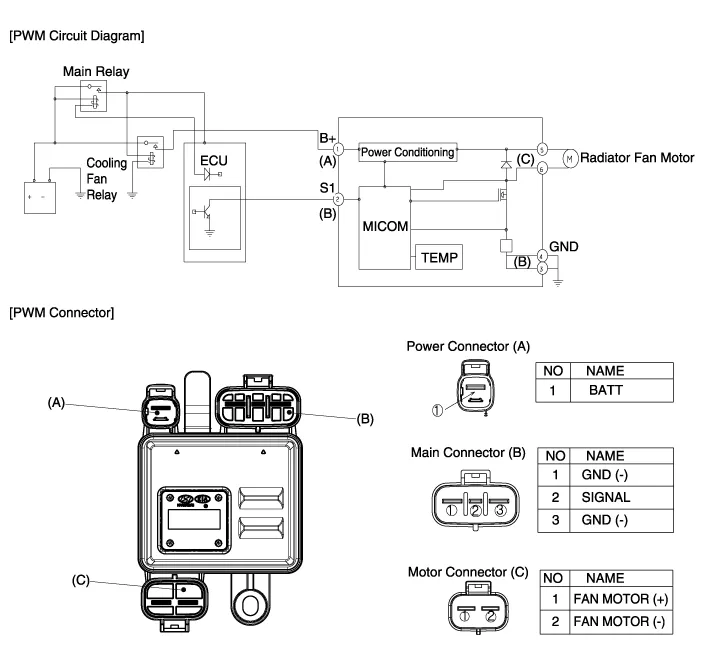
Specifications [Cooling fan control (PWM)] ItemsPerformance specMAX, load current consumption (12V)23.3 + 10% AInputCommunication frequency300
Removal And Installation Cooling fan 1. Disconnect the battery "-" terminal from the trunk room. 2. Remove the air cleaner assembly. (Refer to Intake and Exhaust System - "Air Cleaner") 3.
Other information:
Hyundai Genesis (DH) 2013-2016 Service Manual: High Mounted Stop Lamp Repair procedures
Removal High Mounted Stop Lamp 1. Disconnect the negative (-) battery terminal. 2. Remove the roof trim assembly. (Refer to Body - "Roof Trim") 3. Remove the high mounted stop lamp assembly (A) after loosening the mounting screws. Installation 1.
Hyundai Genesis (DH) 2013-2016 Service Manual: Heater & A/C Control Unit Repair procedures
Self Diagnosis 1. Self-diagnosis process 2. How to read self-diagnostic code After the display panel blinks three times every 0.5 second, the corresponding fault code blinks on the setup temperature display panel every 0.5 second and will show two figures.
Categories
- Manuals Home
- Hyundai Genesis Owners Manual
- Hyundai Genesis Service Manual
- Repair procedures
- 4 Wheel Drive (AWD) System
- Electric Parking Brake (EPB) Repair procedures
- New on site
- Most important about car
