
Hyundai Genesis (DH): Smart Key System / Components and Components Location
Hyundai Genesis (DH) 2013-2016 Service Manual / Body Electrical System / Smart Key System / Components and Components Location
| Component Location (1) |
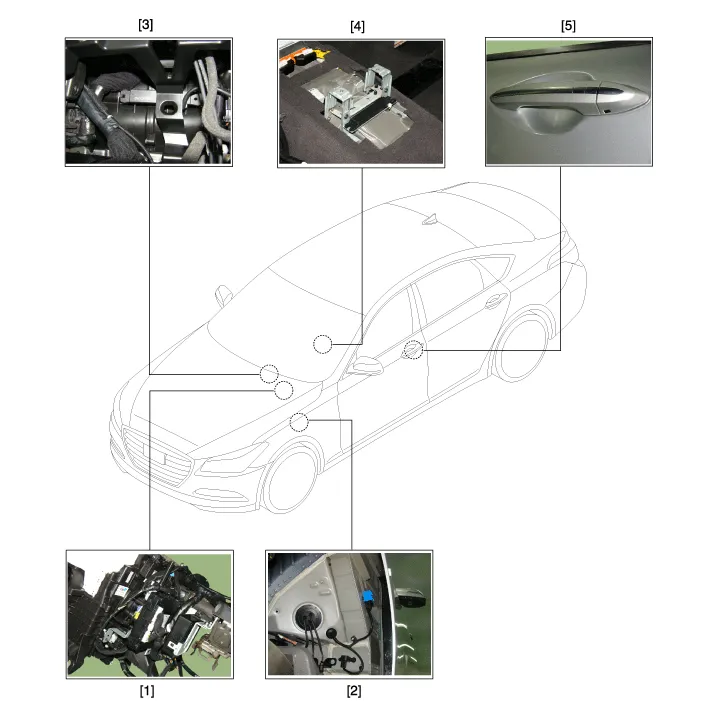
| 1. Smart key unit 2. Buzzer 3. Interior antenna 1 | 4. Interior antenna 2 5. Door outside handle |
| Component Location (2) |
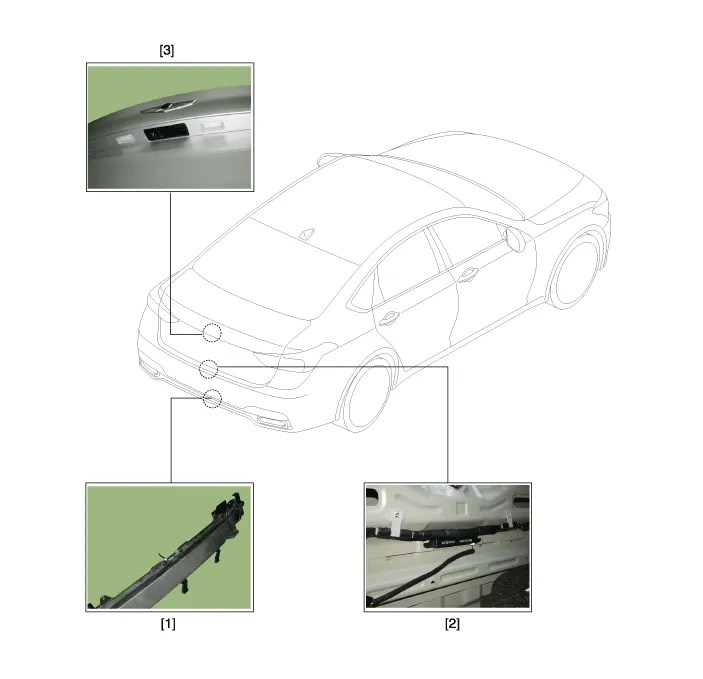
| 1. Bumper antenna 2. Trunk atenna | 3. Trunk open switch |
Specifications Smart Key Unit ItemsSpecificationRated voltageDC 12VOperating voltageDC 9 ~ 16VOperating temperature-22
Description Refer to the "Body Network System" for the abbreviation information. The SMART KEY system is a system that allows the user to access and operate a vehicle in a very convenient way.
Other information:
Hyundai Genesis (DH) 2013-2016 Service Manual: Description and Operation
D
Hyundai Genesis (DH) 2013-2016 Service Manual: Compressor Description and Operation
Description The compressor is the power unit of the A/C system. It is located on the side of engine block and driven by a V-belt of the engine. The compressor changes low-pressure and low-temperature refrigerant gas into high-pressure and high-temperature refrigerant gas.
Categories
- Manuals Home
- Hyundai Genesis Owners Manual
- Hyundai Genesis Service Manual
- Components and Components Location
- Body Electrical System
- Brake System
- New on site
- Most important about car

Copyright В© 2026 www.hgenesisdh.com - 0.0323