
Hyundai Genesis (DH): Heater / Auto Defogging Actuator Repair procedures
Hyundai Genesis (DH) 2013-2016 Service Manual / Heating, Ventilation and Air Conditioning / Heater / Auto Defogging Actuator Repair procedures
| Inspection |
| 1. |
Turn the ignition switch OFF. |
| 2. |
Disconnect the auto defogging connector. |
| 3. |
Verify that the auto defogging actuator operates to the open
position when connecting 12V to terminal 3 and grounding terminal 4.
Verify that the auto defogging actuator operates to the close position when connected in reverse.
|
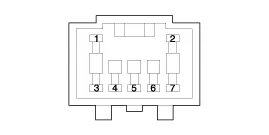
| 4. |
Connect the auto defogging actuator connector. |
| 5. |
Turn the ignition switch ON. |
| 6. |
Check the voltage between terminals 6 and 5.
Specification
Description The auto defogging sensor is installed on front window glass. The sensor judges and sends signal if moisture occurs to blow out wind for defogging. Other information:Hyundai Genesis (DH) 2013-2016 Service Manual: Blind Spot Detection Switch Repair proceduresRemoval 1. Disconnect the negative (-) battery terminal. 2. Remove the crash pad lower panel. (Refer to Body - "Crash Pad") 3. Remove the blind spot detection (BSD) switch (A) after disengaging the mounting clip. Installation 1. Install the crash pad side switch assembly after connecting the connector. Hyundai Genesis (DH) 2013-2016 Service Manual: Description and OperationDescription Control Function This system supports 2 kinds of main function. (Rear video display function, Expected trace of wheels display function) The Rear video display and the expected trace of wheels display operate according to Vehicle speed condition and Gear position. Categories

Copyright В© 2026 www.hgenesisdh.com - 0.0272
|